
Run agents safely, local to cloud.
Get started in seconds.
Install Docker sbx
-
$ brew trust docker/tap && brew install docker/tap/sbx -
> winget install Docker.sbx -
$ sudo apt-get install docker-sbx


One sandbox for every coding agent
One command. MicroVM-based isolation everywhere.
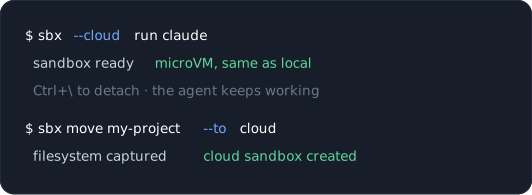
Burst up
Heavy builds on cloud hardware, not your battery
Keep working
Detach and close the laptop, the agent keeps going
Same isolation
Same microVM boundary on both sides, no downgrade
Carry it over
Sbx move recreates a sandbox’s filesystem on the other side, the work comes with it
Pay only for what you use
|
Size |
vCPUs |
GB |
Per hour |
|---|---|---|---|
|
Micro |
1 |
2 GB |
$0.07 |
|
Small |
2 |
4 GB |
$0.14 |
|
Medium |
4 |
8 GB |
$0.28 |
|
Large |
8 |
16 GB |
$0.56 |
|
XL |
16 |
32 GB |
$1.12 |

Stop reviewing.
Start shipping.
Packages, services, repos, pull requests
Private Docker Engine in every sandbox
Off the rails? delete it and start fresh
Move a sandbox between laptop and cloud with one command.
Autonomy for devs.
Boundaries for the org.
One Kit ships a known-good setup to every engineer
Credentials proxied outside the VM
Cloud capacity with the same isolation
Works with the agents your developers already run.
No permission prompts
The sandbox is the safety, not the prompt. Agents run unattended.
Agents can use Docker too
Every sandbox has its own Docker Engine. Build, run, compose. No socket mounting, no host privileges.
Disposable by default
Delete it and start fresh in seconds. Nothing to clean up, nothing to roll back.
Scoped access
You decide which files, endpoints, and secrets the agent gets, before it runs. The boundary is infrastructure.
No, these aren’t containers.
Its own kernel
A hardware boundary. A runaway agent hits a boundary, not your machine.
No Docker-in-Docker compromise
Containers alone force elevated privileges the moment an agent builds images. A private engine per microVM does not.
A VMM we built ourselves
Native on macOS, Windows, and Linux. Cold starts fast enough so you have no reason not to sandbox.
The same sandbox, every time.
Mixin Kits
Layer additional capabilities onto Claude Code or Codex.
Agent Kits
Define a full agent: its image, its entrypoint, the network it can reach.
Credentials never enter the VM
The real secret stays on your host.
Give a sandbox exactly the tools it needs.
Curated catalog ships with the CLI
Scope servers per sandbox, one project gets GitHub, the rest get nothing
Server credentials live in the sbx secret store
Works with whichever agent runs inside.
Everyone else makes you choose.
|
Docker |
E2B |
Daytona |
Modal |
Cloudflare |
|
|---|---|---|---|---|---|
|
Isolation on your machine |
MicroVM, own kernel |
None, cloud only |
None, cloud only |
None, cloud only |
Shared-kernel container for dev parity |
|
Runs in the cloud |
Yes, same microVM model |
Yes |
Yes |
Yes |
Yes |
|
Move a sandbox between them |
One command, sbx move |
No |
No |
No |
No |
|
Self-hosting means |
Your laptop, today |
Your AWS or GCP, via Terraform and Nomad |
Your cloud, control plane stays on Daytona’s |
Modal-managed infrastructure |
Cloudflare’s infrastructure |
|
Docker inside the sandbox |
Private engine per sandbox |
– |
– |
– |
– |
Common questions
What is a sandbox for coding agents?
A disposable, isolated environment where an agent works unattended, with a real dev environment and scoped access to your files, network, and secrets. Your host stays untouched.
How is this different from a container?
A container shares your kernel. A sandbox is a microVM with its own kernel and its own private Docker Engine, so an agent can build and run containers without the elevated privileges Docker-in-Docker requires.
Which agents are supported?
Claude Code, Codex, Cursor, Devin, Copilot CLI, OpenCode, and autonomous systems like NanoClaw. Same isolation, same speed, one sandbox model.
Is YOLO mode actually safe here?
Yes. Permissive modes are the default because the boundary is infrastructure, not the agent’s judgment.
Do I need Docker Desktop?
No. Docker Sandboxes is free and standalone.
What are Sandbox Kits?
Declarative YAML applied at startup. Kits add tools, files, credentials, and network rules to an agent, or define a whole agent, without rebuilding the image.
Can agents use MCP servers inside a sandbox?
Yes. Enable servers from the built-in catalog per sandbox with sbx mcp, with credentials held in the sbx secret store. For MCP governed across an organization, every client, one endpoint, policy and audit on each call, see MCP Enterprise Gateway.
What are Cloud Sandboxes?
The same sandbox on Docker-managed infrastructure, with the same microVM isolation. Detach and the agent keeps working. sbx move carries a sandbox’s filesystem between local and cloud, in either direction.
What if I need org-wide controls?
Docker AI Governance enforces network, filesystem, and MCP policy across every sandbox in the organization, from one console.
Need More Control Over Your Sandboxes?
Talk to us about:
Network access policies for sandbox environments
Filesystem access controls and restrictions
Admin-level configuration for your team